lnmp之安装PHP模块/扩展(不需要重装PHP)
VPS侦探一直在努力的去营造一个VPS相关话题的交流环境,于是有了很多的VPS相关的教程、QQ群、有了论坛、有了LNMP一键安装包...,在此说明一下Linux下PHP模块/扩展都是采用此方法安装或安装php直接编译进去,PHP的dll模块/扩展文件是Windows下php模块的使用方法,两者是无法通用的!!
VPS侦探主要根据论坛上lnmp版块用户反映来写一些教程,今天说一下如何为lnmp的php安装一些自己需要的模块,下面主要有两种方式进行安装:源码编译方式安装和pecl方式进行安装。
源码编译安装
安装前
安装前建议先执行 /usr/local/php/bin/php -m (此命令显示目前已经安装好的PHP模块)看一下,要安装的模块是否已安装。然后下载当前PHP版本的源码并解压。
大部分php扩展/模块的源码编译安装就是三个步骤,在源码目录下执行:
/usr/local/php/bin/phpize
./configure --with-php-config=/usr/local/php/bin/php-config
make && make install
有些模块可能会稍微有差异(如要求添加一些参数),但是 --with-php-config=/usr/local/php/bin/php-config 是所有PHP模块最基本的参数这个是必须要有的,具体看模块的安装文档就可以。
本文以imap和exif模块为例,进入php源码目录下ext,里面会有大部分模块的源码,这里都是php自带模块,第三方模块的话需要自己找第三方模块的源码。
一、安装imap模块
1、安装imap模块前需要先安装imap所需的库:
CentOS :yum install libc-client-devel
Debian:apt-get install libc-client-dev
2、首先进入php安装目录的ext目录
比如php的源码目录为:/root/lnmp1.3-full/src/php-5.4.45/
则执行:cd /root/lnmp1.3-full/src/php-5.4.45/ext/ ###一般安装完LNMP php源码都是自动删除了的,需要自己进入src目录下解压对应版本的php源码包。###
我们要安装imap模块,执行cd imap/
再执行 /usr/local/php/bin/phpize 会返回如下信息:
Configuring for:
PHP Api Version: 20041225
Zend Module Api No: 20060613
Zend Extension Api No: 220060519
再执行以下命令:
[root@vpser imap]# ./configure --with-php-config=/usr/local/php/bin/php-config --with-kerberos --with-imap-ssl [root@vpser imap]# make && make install执行完返回:
Build complete.
Don't forget to run 'make test'.
Installing shared extensions: /usr/local/php/lib/php/extensions/no-debug-non-zts-20060613/
表示已经成功,再修改/usr/local/php/etc/php.ini
查找:extension_dir 再下面一行添加上extension = "imap.so"
保存,执行/etc/init.d/php-fpm restart 重启。
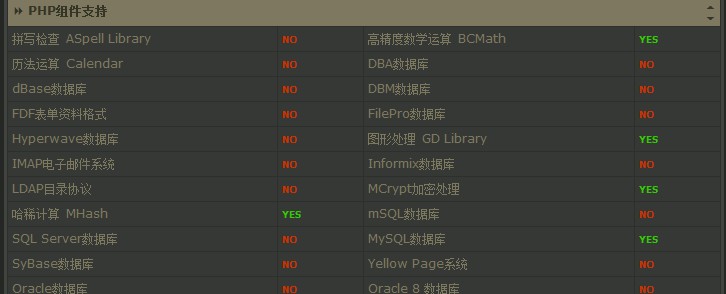
在浏览器里面输入http://ip/p.php,打开探针,安装IMAP模块前:
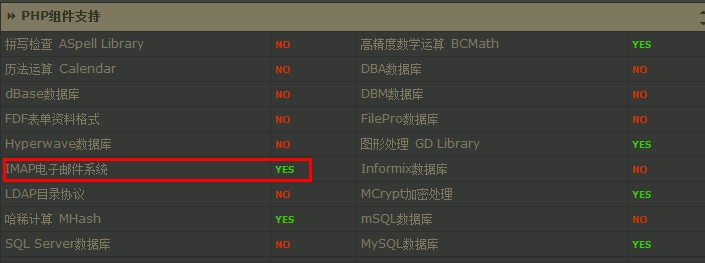
安装IMAP模块后:
二、安装exif模块
安装exif不需要另外安装库,所以省略掉了安装库的步骤。
比如php的源码目录为:/root/lnmp1.3-full/src/php-5.4.45/
则执行:cd /root/lnmp1.3-full/src/php-5.4.45/ext/
我们要安装exif模块,执行cd exif/
再执行 /usr/local/php/bin/phpize 会返回如下信息:
Configuring for:
PHP Api Version: 20041225
Zend Module Api No: 20060613
Zend Extension Api No: 220060519
再执行以下命令:
[root@vpser imap]# ./configure --with-php-config=/usr/local/php/bin/php-config [root@vpser imap]# make && make install执行完返回:
Build complete.
Don't forget to run 'make test'.
Installing shared extensions: /usr/local/php/lib/php/extensions/no-debug-non-zts-20060613/
表示已经成功,再修改/usr/local/php/etc/php.ini
查找:extension = 再最后一个extension= 后面添加上extension = "exif.so"
保存,执行/etc/init.d/php-fpm restart 重启。
在/home/wwwroot/下面创建一个exif.php的文件,内容如下:
<?php
$exif = read_exif_data ('IMG_0001.JPG');
while(list($k,$v)=each($exif)) {
echo "$k: $v<br>\n";
}?>
其中IMG_0001.JPG为照片文件。
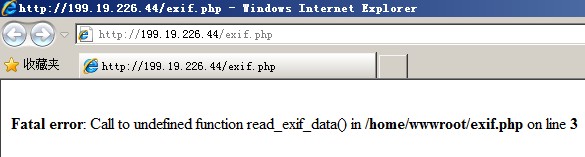
未安装exif模块前:
安装exif模块后:
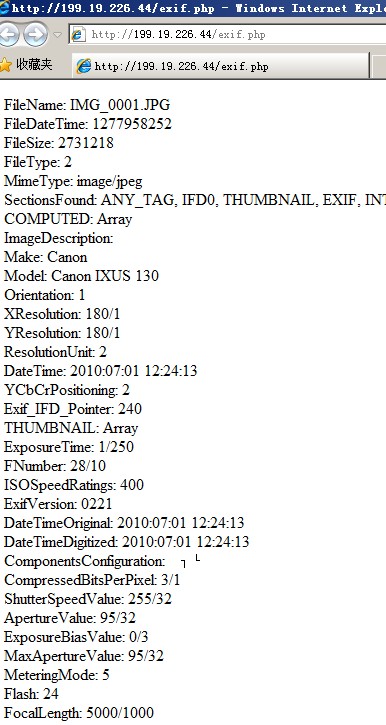
可以读出照片的exif信息。
安装其他模块也基本上都是这两种方式,当./configure --with-php-config=/usr/local/php/bin/php-config 执行这个的时候是会检查系统上库是否安装上,如果没有安装上就会报错,按错误提示安装相关的库就行。
pecl方式安装
pecl方式安装是使用pecl install xxx 命令的方式,xxx为php模块名字,但是该php模块必须是 https://pecl.php.net 上面的且必须要提前按要求安装好依赖包,不同php模块可能不需要也可以需要安装,具体可以官网手册 https://www.php.net/manual/en/index.php 中查询。
lnmp默认禁用掉了部分php函数,需要将exec、popen、readlink这些函数从禁用函数中去掉,可以在/usr/local/php/etc/php.ini 中查找disable_function 就可以在后面看到是否有禁用函数。
安装好依赖包就可以直接,pecl install xxx 进行安装php模块。
如果还有其他问题,可以到https://bbs.vpser.net提问,记得提问前在https://bbs.vpser.net/search.php搜索一下哦。
>>转载请注明出处:VPS侦探 本文链接地址:https://www.vpser.net/manage/lnmp-php-install-ext.html








军哥,可不可以出一个安装php sendmail的教程?谢谢
@罗, 只要没手动操作进行升级级肯定不会自己就变,只要是变了肯定是升降级过或者通过其他方式安装了新的php
装环境php版本7.1.7 然后使用一段时间发现版本变成了5.X 之后我手动升级到了7.1.7 为什么会版本会变化
@刘liu6, find / -name libc-client.a 看一下
执行:yum install libc-client-devel时候报如下信息。说是已经安装了这个依赖了
Loaded plugins: fastestmirror
Loading mirror speeds from cached hostfile
Package libc-client-2007f-16.el7.x86_64 already installed and latest version
Package uw-imap-devel-2007f-16.el7.x86_64 already installed and latest version
Nothing to do
然后执行完./configure --with-php-config=/usr/local/php/bin/php-config 进行make && make install 时候报
configure: error: Cannot find imap library (libc-client.a). Please check your c-client installation.
请问 我这个依赖已经安装了 为啥还报这个错呢?该怎样解决呢?谢谢
@Clin, 自己解压php源码包,ext目录下,文章有说明
如果安装EXIF呢 我根本没有找到这个文件夹
@centos_, 那是直接buildin的升级php就一起升级了
@奔跑, 这个是跟随系统的
大神,对于lnmp安装时候直接编译进去的扩展模块,怎么单独升级?